Facebook Offline Conversions API Is Deprecated, But Offline Conversions Still Exist

Facebook Offline Conversions API was deprecated in May 2025. Here's how offline conversion tracking, feedback loops, and Signal Engineering actually work now

SV
Shalini Vijayakumar
5 min read

If you’re searching for “Facebook Offline Conversions API,” there’s something important you need to know before going any further:

Meta deprecated the Offline Conversions API in May 2025. But that doesn’t mean offline conversion tracking disappeared.

What changed is how Meta wants businesses to send those conversions.

Meta’s recommendation is to migrate Offline Conversions API integrations to Conversions API and Datasets. The standalone endpoint was officially discontinued on May 14, 2025, with Graph API v16.0 as the last supported version.

The Zapier “Facebook Offline Conversions” app was frozen on June 4, 2024 and stopped running on May 1, 2025 — teams that leaned on integration platforms had to rebuild against Datasets and CAPI.

So this isn’t going to be another outdated guide showing you how to configure something Meta has already deprecated.

Why Offline CAPI Existed In The First Place?

Meta built the Offline Conversions API in 2016 for one specific problem: brick-and-mortar retailers who couldn’t prove that a Facebook impression on Tuesday drove an in-store purchase on Saturday.

The pixel could not see the register. The Custom Audiences API could ingest hashed customer lists, but there was no way to attach when a conversion happened, what it was worth, and which ad account should be credited.

Offline CAPI was brought in to fix this specifics: hash the customer, timestamp the event, attach it to an Offline Event Set, and Meta’s attribution engine could reach back through impression history and credit the ad.

Retail was the beachhead. B2B and lead-gen followed within eighteen months once agencies realized the same endpoint could ingest CRM stage changes — QualifiedLead, Opportunity, Closed-Won — and use them as optimization events. For nearly a decade Offline CAPI was the sanctioned path for anything the pixel could not observe.

Why Meta Killed Offline CAPI (and Why the Migration Broke Everyone’s Pipeline)

Meta consolidated Offline CAPI into CAPI + Datasets for two reasons:

  • iOS 14.5 forced a need for one unified server-side ingest surface across web, app, and offline events (rather than maintaining two schemas, two hashing pipelines, and separate ODQ/EMQ quality metrics).
  • New action_source values like "physical_store" and "system_generated" gave CAPI equal or better matching fidelity than the old offline-only endpoint, making Meta’s official developer guidance the sole canonical reference going forward.

But the migration itself broke things: naive lift-and-shifts saw roughly a coin-flip chance of accepted event volume dropping hard, with three separate 2024–2025 write-ups (Aimerce, Adsmurai, DataCops) reporting up to a 70% drop, driven by non-interchangeable Dataset IDs replacing Offline Event Set IDs (silently failing events that show “accepted” but never attach to attribution), action_source shifting from optional to mandatory, the old upload_tag metadata disappearing, and match-key normalization — mixed-case emails, punctuated phone numbers, unhashed external_id — going from tolerated to outright rejected, all with no server-side migration wizard to catch it.

Instead of another Offline CAPI how-to, we’ll cover the whole picture:

  • What offline conversions are, across every vertical that runs them
  • Why feeding offline outcomes back to Meta matters — the feedback loop, mechanically
  • How Meta’s algorithm actually consumes offline signals inside Advantage+ and Lookalike training
  • Where Signal Engineering comes into this — the six-pillar discipline behind clean CAPI
  • How to track offline conversions today, step by step
  • How to integrate offline conversions using CustomerLabs
  • Real-world case studies (Fateh, Meydan FZ, Dundas Life) showing the feedback loop and Signal Engineering in action
  • Common mistakes that mess up offline attribution, with diagnostic patterns for each

Gear up, this is going to be one lengthy blog.

What are offline conversions?

You should probably already know this. But this is a complete guide, so here we are.

An offline conversion is a customer action that happens outside Meta’s direct visibility but has business value. The Meta pixel can’t see it, yet it’s the moment your revenue actually moves.

Something like this: Meta Ad → Lead → Sales call → Opportunity

Meta deprecated the transport, not the concept

This distinction gets lost in the deprecation coverage and it’s worth being explicit about. Meta discontinued the transport layer — the Offline CAPI endpoint. Offline conversions themselves, as a category of signal, are more important now than they’ve ever been. The transport got consolidated into CAPI. The concept — of feeding Meta what happened after the click so it can optimize on outcomes rather than proxies — did not change.

Connect Meta CAPI to send offline conversions data with CustomerLabs

How Meta’s algorithm actually consumes offline signals?

Meta’s ad delivery is a learning system. It gets better at finding the customers you want when you feed it evidence of what a customer actually looks like. Without that evidence, it optimizes on the last thing it saw — usually the top of your funnel.

Down below you can find the difference on how Meta sees with and without the feedback loop.

Closing the feedback loop — how Meta sees your funnel with and without offline conversions

Here is exactly what happens under the hood.

Step 1: The event lands on the Dataset

Your Conversions API (CAPI) payload arrives at Meta’s endpoint (POST /{dataset-id}/events). The ingestion service validates the schema, hashes any unhashed personal data, and writes the event to the Dataset. This layer is a strict gatekeeper — it will reject malformed payloads and expired timestamps. If your Offline Data Quality score is stuck at a 3, this is the layer that is rejecting what you think you are sending.

Step 2: Meta matches events to user profiles

Next, Meta’s identity resolution attempts to bind the CRM event to a specific user profile using every identifier you provided: hashed email, hashed phone, external_id, fbp (the browser cookie captured on an earlier web touchpoint), and fbc (the click ID from the URL). More identifiers equal a higher match rate. This dictates your Event Match Quality (EMQ) and Offline Data Quality (ODQ). A score below 5 means your hashing or coverage is broken; a 7 or higher means the algorithm has enough to work with.

Step 3: The learning phase weights the matched event

Once matched, the conversion becomes a training example for the campaigns that served the impression. This is where offline data radically changes campaign behavior.

Consider Fateh’s 20% increase in their lead-to-opportunity ratio after sending offline conversions data.

Before integrating offline data, their campaigns optimized purely on pixel-level form submissions. Meta was training delivery on “people likely to submit a form,” without any downstream feedback on which leads were actually good. Using CustomerLabs, Fateh pushed high-intent CRM stages back through CAPI and optimized the campaign for those deeper funnel events.

Fateh increased lead-to-opportunity ratio by 20% using 1PD Ops

Meta’s learning phase reweighted delivery toward users whose profiles resembled qualified opportunities rather than just initial leads, increasing their lead-to-opportunity ratio by 20% and boosting their click-to-conversion rate by 12%.

Fateh's click-to-conversion rate improvement using 1PD Ops

Step 4: Advantage+ value optimizes on matched revenue

If you send custom_data.value and custom_data.currency alongside the event, Advantage+ campaigns stop optimizing just for conversion volume and start optimizing for expected revenue. A $12,000 Opportunity trains the delivery algorithm much harder than a $400 one.

Meyden FZ did the same and increased 200%+ ROAS.

Originally, they only sent top-of-funnel leads back to Meta, leaving Advantage+ Sales to optimize on a massive, noisy pool of “people who fill out UAE business-setup forms.”

Meydan Google Ads screen showing offline conversions optimization

By sending the full CRM progression, ending in a PaidCustomer stage carrying the actual contract value, the algorithm shifted its target. Meta began bidding higher CPMs specifically for high-intent, high-value profiles, drastically improving their return on ad spend.

Step 5: Lookalike seeds pull from matched lists

When you build a 1% Lookalike audience from “people who fired Closed-Won in the last 180 days,” Meta only uses the matched users from your offline event stream as the seed. Unmatched events are ignored.

This means a low ODQ corrupts your Lookalikes. If only 40% of your closed customers match, your Lookalike is built on an incomplete cohort, biased toward whichever users happened to have complete identifiers rather than your true ideal customer profile.

Fateh and Meydan benefitted from sending offline conversions the right way with CustomerLabs

How This Changes Your Campaign Outcomes

Every discipline in offline tracking traces back to making one or more of those steps run cleaner, fundamentally changing how your account operates:

  • Smarter Optimization: You give Meta the signals to find users who actually progress down the funnel, rather than stopping at the cheapest top-of-funnel action.
  • Sharper Audience Learning: Systems like Advantage+ and Lookalikes finally understand the characteristics associated with your most valuable, revenue-generating outcomes.
  • True Measurement: You can clearly see which campaigns generate actual pipeline and closed-won revenue, rather than vanity metrics.
  • Better Strategic Decisions: You stop asking “Which campaign generated the cheapest leads?” and start asking “Which campaign generated the business outcomes we actually care about?”

Modeled Attribution: Why Offline Signals Shrink the Guesswork

Meta’s own guidance puts the Conversions API at roughly a 13% lift in CPA efficiency and a 20% lift in lead-to-sale conversion rates on average. But the more crucial stat sits underneath that.

Industry estimates: Adlibrary’s 2026 attribution analysis estimates that 20–40% of conversions that were previously directly observable are now modeled, delayed, or invisible at the user level post-ATT.

It’s a conversion Meta inferred using probabilistic models based on click patterns, cohort behavior, and the small subset of users where identifiers did happen to match.

Modeled attribution isn’t fake; it’s Meta’s best guess. But guesses degrade under noise.

Every unmatched user in your offline event stream is another data point the modeler has to interpolate. When you feed Meta clean offline signals with valid identifiers, the modeled share shrinks because more of the observed events actually attach to specific users. That is the whole thing: trading modeled attribution for observed attribution by fixing the input signal.

But simply sending more conversion events back to Meta isn’t the complete answer. If you send garbage, Meta will optimize for garbage with extreme precision.

What you send matters just as much as how you send it. And that’s where Signal Engineering enters the picture.

Signal Engineering to Train Meta With Clean First-party Signals

Traditional offline conversion tracking asks: “How do I send my offline conversions to Meta?”

Signal Engineering asks: “Which business outcomes should I send to Meta so the algorithm receives better signals?”

That’s a different problem, and the answer isn’t more data — it’s more deliberate data. Consider a normal funnel: Lead → Qualified Lead → Opportunity → Customer.

Every event has a different level of business intent.

If you only send Lead, Meta gets feedback about who becomes a lead.

But your business probably cares much more about: QualifiedLead / Opportunity / Customer.

Don’t just send signals. Engineer the signals Meta receives.

Signal Engineering is a discipline, not a toggle. It has six pillars, and each pillar is a specific thing you can inspect, measure, and improve.

Pillar 1 — Signal quality

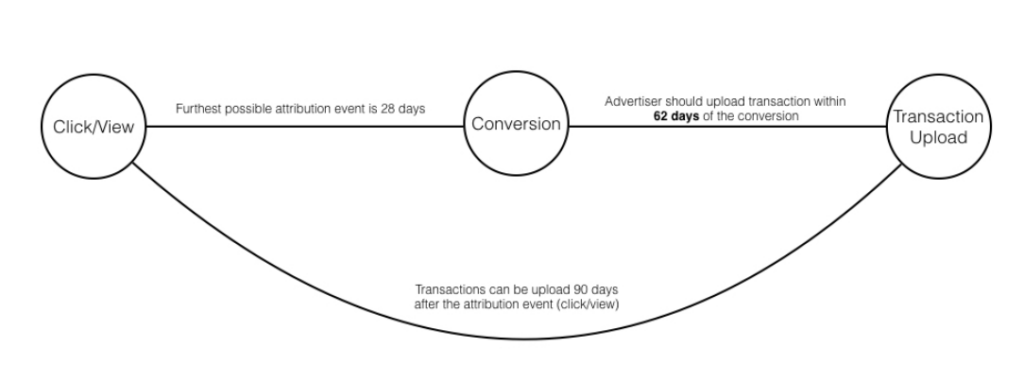
Signal quality is the mechanical correctness of every event you send. Correctly hashed identifiers, formatted timestamps inside the 62-day window, action_source, schema on user_data and custom_data. When Meta says a Dataset’s Offline Data Quality is 3, this is almost always what’s broken.

The single most common failure is hashing normalization. Meta requires lowercase, trim whitespace and hash SHA-256 on emails and phones. Skip the normalization step and the same user hashes to different values from your web pixel and your CRM, and matching collapses. Concretely:

Input: "Jane.Doe@Acme.com"
Wrong: SHA-256("Jane.Doe@Acme.com")
= a fingerprint that will not match the pixel's hash of the same user
Right: SHA-256("jane.doe@acme.com")
= the fingerprint Meta expects, matches the pixel's hash of the same user

Phone numbers follow the same rule — E.164 formatting first (+1***512345*7, no dashes, no parentheses, no spaces), then SHA-256. Get either of these wrong and your ODQ (offline data quality) tanks even though your CAPI ingest looks healthy.

Pillar 2 — Signal relevance

Align the events you send to the outcomes your business actually cares about. A furniture retailer sends in-store purchases, not just website add-to-cart. A B2B SaaS sends Closed-Won and Renewal, not just Lead.

A dental clinic sends attended-visits, not just appointment-booked. The relevant question is: what event, if Meta optimized on it, would move my revenue? Send that. Don’t send the ten others just because your CRM has them.

Pillar 3 — Signal volume

Meta needs enough events per week to learn. The ad-set-level learning phase needs 50 conversions per week to exit; below that, delivery stays in the “learning limited” state and CPMs bid conservatively.

Bottom-funnel-only strategies routinely starve the algorithm. If you have 8 Closed-Won deals a month, don’t set that as the sole optimization event or you’ll never exit learning. Optimize on a higher-volume mid-funnel event (QualifiedLead, Opportunity) while still sending Closed-Won as a training signal and a Lookalike seed.

Pillar 4 — Signal freshness

Send stage transitions as they happen, not in a nightly batch that’s already 24 hours stale. Two mechanical reasons.

First: the 62-day upload window is measured from event_time, so a batch that’s already 48 hours old on export loses two days of window and eventually starts silently dropping older events.

Second, and more important: Meta’s learning phase weights recent conversions more heavily. A conversion delivered within an hour of the actual stage change trains delivery for the next day’s auctions. A conversion delivered 24 hours later trains delivery for auctions two days after the event happened — and the users the algorithm was trying to model may have already moved through their consideration cycle.

Concrete example: if your CRM syncs to CustomerLabs (or CAPI directly) nightly at 2 AM, a QualifiedLead event that happens at 9 AM today doesn’t reach Meta’s learning phase until roughly 24 hours later.

If your ad set is optimizing on QualifiedLead with a 7-day click / 1-day view attribution window, you’ve just delayed the algorithm’s feedback by more than 10% of the attribution window. Real-time or near-real-time streaming (webhooks, event-driven) beats nightly batches every time.

Pillar 5 — Identity / match quality

Hashing consistency, external_id coverage, fbp and fbc carried forward from web to CRM. This is the biggest single lever on Event Match Quality and Offline Data Quality. Understanding the three identifiers matters:

  • external_id — your internal user ID (customer ID, CRM contact ID). It should be SHA-256 hashed and sent on both the web-side pixel/CAPI event and the offline CRM event. When it matches, Meta binds the two events to the same user profile without ever needing email or phone.
  • fbp — the Facebook browser cookie. Set the first time a user hits your site with the pixel loaded. Value looks like fb.1.17**39000***0.12345**8*0. This is captured client-side and needs to be stored server-side (into your database, into your CRM contact record) at the moment the user first identifies themselves — form fill, account creation. Then when the CRM later fires Opportunity for that same contact, you attach the stored fbp to the offline event. Carrying fbp forward is the single highest-leverage fix on EMQ that most teams miss.
  • fbc — the click identifier, derived from the fbclid URL parameter Meta appends to ad-click destination URLs. Capture it at the landing page, persist it the same way you persist fbp, and attach it to downstream offline events. When fbc is present, Meta can match the offline event to the exact ad click that started the journey.

Dundas Life moved EMQ from 3 to 7 in exactly this way — they weren’t collecting fbp on their web forms and their retargeting was dying because the offline events couldn’t bind to any earlier browser session.

Fixing fbp capture, adding external_id coverage, and enforcing hashing consistency across every ingestion point took EMQ from a floor-level 3 to a healthy 7.

Pillar 6 — Choosing meaningful downstream conversion events

Pick two or three events across the funnel to optimize on (QualifiedLead, Opportunity, Purchase) rather than sending everything. Fateh’s 71% CPQL drop came from exactly this decision — teaching Meta to optimize on QualifiedLead and Opportunity instead of the default Lead. The heuristic: pick the earliest stage that reliably correlates with revenue and has enough volume to exit learning.

That’s usually not Lead (too noisy) and usually not Closed-Won (too sparse in most funnels) — it’s the qualification stage in between.

This is what Andrew Foxwell, co-founder of Foxwell Digital, has made the complementary structural argument on the Cobble Hill podcast: “the accounts that survived iOS 14.5 are the ones that treated first-party data infrastructure as a media investment, not a compliance chore.”

Implement Signal Engineering in your business today using 1PD Ops

So next comes, how to track offline conversions.

How to Track Facebook Offline Conversion Integration Using CustomerLabs

At the architecture level, integrating your offline conversion data into Meta using CustomerLabs looks like this:

CRM / POS / Offline Source → CustomerLabs → Identity ResolutionSignal Engineering → Meta Conversions API → Meta Dataset

Rather than building custom API pipelines for every tool in your stack, you can use CustomerLabs as the ingestion and identity layer.

Step 1: Connect Your Offline Event Sources

Before sending data to Meta, you need to bring your offline conversions into CustomerLabs. You can do this by setting up webhooks from whichever system records the outcome. Each CRM has its own native routing mechanism to fire a webhook when a contact changes stages.

Here are the configuration guides for the most common offline sources:

  • Salesforce: Configure record-triggered flows to send Account, Contact, and Opportunity stage changes. (Salesforce Setup Guide)
  • Zoho CRM: Use native webhook automations based on stage-change conditions. (Zoho CRM Setup Guide)
  • Custom Webhooks: For internal backend systems, POS setups, or CRMs like HubSpot and Pipedrive, you can route payloads directly to a universal endpoint. (Custom Webhook Setup Guide)

Once your source is flowing, CustomerLabs resolves the identities (binding the CRM email/phone back to the web touchpoint’s fbp and fbc parameters) and normalizes the hashing automatically.

Step 2: Configure the Meta Offline Conversion Destination

With your source data unified, you can push those conversion signals directly to your Meta Dataset.

  • Navigate to Destinations: Log in to your CustomerLabs account, click on Destinations in the left sidebar, and select Facebook Offline Conversion from the All Destinations tab.
  • Authenticate Your Meta Account: Go to Configuration Settings and click Authenticate Facebook account. Select the Business Manager account, the specific Pixel (Dataset), and the Ad Account you want to connect.
  • Enable Server-Side Delivery: In the Configuration Settings, toggle ON the option for Send data via server-side. This ensures the events route securely through the Conversions API rather than attempting browser-level delivery.
  • Setup Event Workflow: Navigate to Setup event workflow within the Meta destination settings. Toggle ON the specific offline events you are receiving from your CRM (e.g., Opportunity, QualifiedLead, Closed Won).
  • Map Event Fields: Verify that your identifiers and custom values are properly mapped. CustomerLabs automatically normalizes and hashes standard parameters, but you must ensure your source field for revenue (if applicable) is mapped to custom_data.value so Advantage+ campaigns can value-optimize.
  • Enable Audience & LDU Settings (Optional): If you are operating in US regions subject to privacy regulations, toggle ON the Limited Data Use (LDU) Configuration. You can also enable URL parameters for audience attribution if you plan to use this data for retargeting.

Once saved, CustomerLabs begins firing your offline events to Meta in real-time. Because the platform automatically appends the click IDs and browser cookies captured during the initial web visit, your Event Match Quality (EMQ) and Offline Data Quality (ODQ) scores will reflect a fully optimized pipeline.

Why You Should Choose CustomerLabs Beats Direct CAPI Integration For Most Teams

Directly coding webhooks from your CRM to Meta sounds simple on paper, but in practice, custom CAPI scripts quickly turn into an ongoing engineering burden. Here is how an integration layer like CustomerLabs eliminates the technical traps of direct integrations:

1. Hashing & Normalization Errors

Minor formatting differences (like Jane.Doe@company.com vs jane.doe@company.com) produce completely different SHA-256 hashes, ruining your match rates and Offline Data Quality (ODQ) score.

With CustomerLabs, data normalization — stripping irrelevant or sensitive data, lowercasing, and hashing identifiers — happens automatically across every incoming source.

Manually logging browser cookies (fbp) and click IDs (fbc) on a first visit, persisting them in your CRM, and attaching them to an offline conversion weeks later requires complex database architecture.

CustomerLabs automatically captures fbp and fbc at the first web touchpoint, binds them to the user profile, and appends them to all future downstream CRM events.

3. Complex Deduplication Logic

Generating matching event_id keys across browser pixels and delayed server webhooks to prevent double-counting is difficult to maintain across disjointed systems.

The platform automatically generates and maps unified event IDs across both browser and server layers to ensure clean deduplication.

4. API Schema Failures

When Meta updates validation rules or deprecates API endpoints, hardcoded scripts break silently, dropping accepted event volume until engineers step in.

The integration layer handles platform updates, schema shifts, and endpoint deprecations in the background, shielding your campaigns from data loss.

5. Lack of Multi-Platform Scalability

Custom-building a Meta pipeline means repeating the entire engineering project from scratch for Google Enhanced Conversions, LinkedIn CAPI, and TikTok.

You normalize your offline event stream once and instantly route that same high-quality data to Meta, Google, LinkedIn, and TikTok without writing additional code.

Turning Offline Data into Your Biggest Competitive Advantage

At the end of the day, Meta’s algorithm is only as smart as the signals you feed it. As ad platforms lean heavier on machine learning, campaign success comes down to signal quality.

Managing this plumbing manually with custom scripts sounds straightforward until you are hit with silent 62-day event drops, broken hash matching, duplicated purchase data, and campaign learning phases stuck in limbo. Trying to fix these issues inside your ad account usually means patching symptoms rather than fixing the underlying pipeline.

That is exactly why growth teams use CustomerLabs.

As a complete First-Party Data Ops platform, CustomerLabs eliminates the engineering headache and automatically solves the common failure points of offline tracking:

  • Automated Identity Resolution: Normalizes, lowercases, and hashes customer data perfectly every time while automatically persisting fbp and fbc parameters across the entire user lifecycle.
  • Seamless Deduplication: Assigns unified event IDs across browser pixel and server CAPI streams so your reported revenue is never artificially inflated.
  • Precision Signal Engineering: Lets you easily map, filter, and optimize the exact CRM lifecycle stages that keep event volume high while pushing true revenue signals into Meta’s learning phase.
  • No Engineering Upkeep: Absorbs Meta’s schema updates and endpoint changes in the background so your signal pipeline never breaks.

Instead of spending weeks troubleshooting CAPI errors, you can give Meta’s algorithm the clean, high-match offline data it needs to find your actual best customers.

Ready to Stop Guessing and Start Optimizing?

Whether you want to see how your current match rates compare or want a turnkey setup that connects your CRM directly to Meta Conversions API:

See a personalized walkthrough of how CustomerLabs integrates with your specific stack and cleanses your offline signals.

Get started today, connect your data sources, and boost your Offline Data Quality score in just a few clicks.

FAQ

Frequently Asked Questions

Is the Facebook Offline Conversions API still working in 2026?

No, the standalone Offline Conversions API was discontinued on May 14, 2025. Graph API v16.0 was the last version to support it, and any traffic still hitting the legacy endpoint has been rejected since. Offline events now flow through the standard Conversions API (CAPI) attached to a Dataset, using action_source: "physical_store" for in-store events and action_source: "system_generated" for CRM and backend events.

Is the Facebook Offline Conversions API still working in 2026?

No, the standalone Offline Conversions API was discontinued on May 14, 2025. Graph API v16.0 was the last version to support it, and any traffic still hitting the legacy endpoint has been rejected since. Offline events now flow through the standard Conversions API (CAPI) attached to a Dataset, using action_source: "physical_store" for in-store events and action_source: "system_generated" for CRM and backend events.